Parameter Management#
Overview#
Pyralysis provides a robust foundation for handling optimization parameters through its Parameter class. This unified interface supports multiple array backends, automatic conversion, flexible chunking, and comprehensive mathematical operations.
Note
The Parameter class serves as the foundation for all parameters that can be optimized by reconstruction algorithms, providing common functionality for data storage, chunking, and spatial sampling properties.
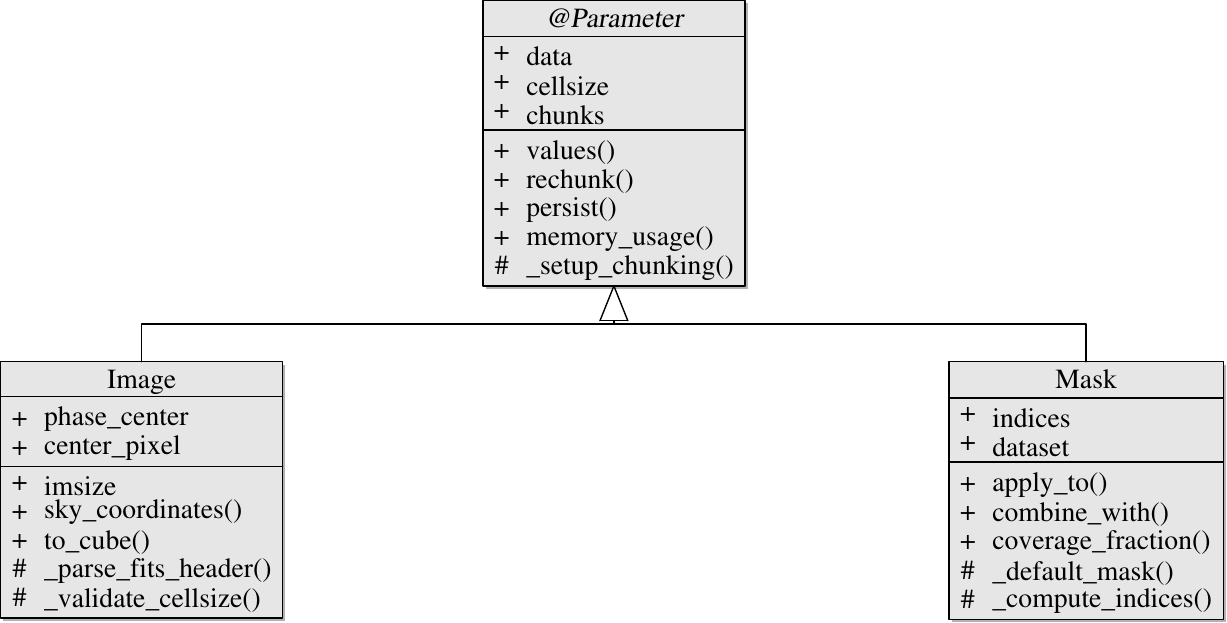
Reconstruction parameter hierarchy (Parameter / Image / Mask).#
Key Features#
Multiple Array Backends: Seamless support for numpy, dask, and zarr arrays
Automatic Conversion: Automatic conversion to xarray DataArrays for consistency
Flexible Chunking: Configurable Dask chunking for performance optimization
Mathematical Operations: Full operator overloading for arithmetic and comparison operations
Memory Management: Efficient memory usage with optional persistence and computation
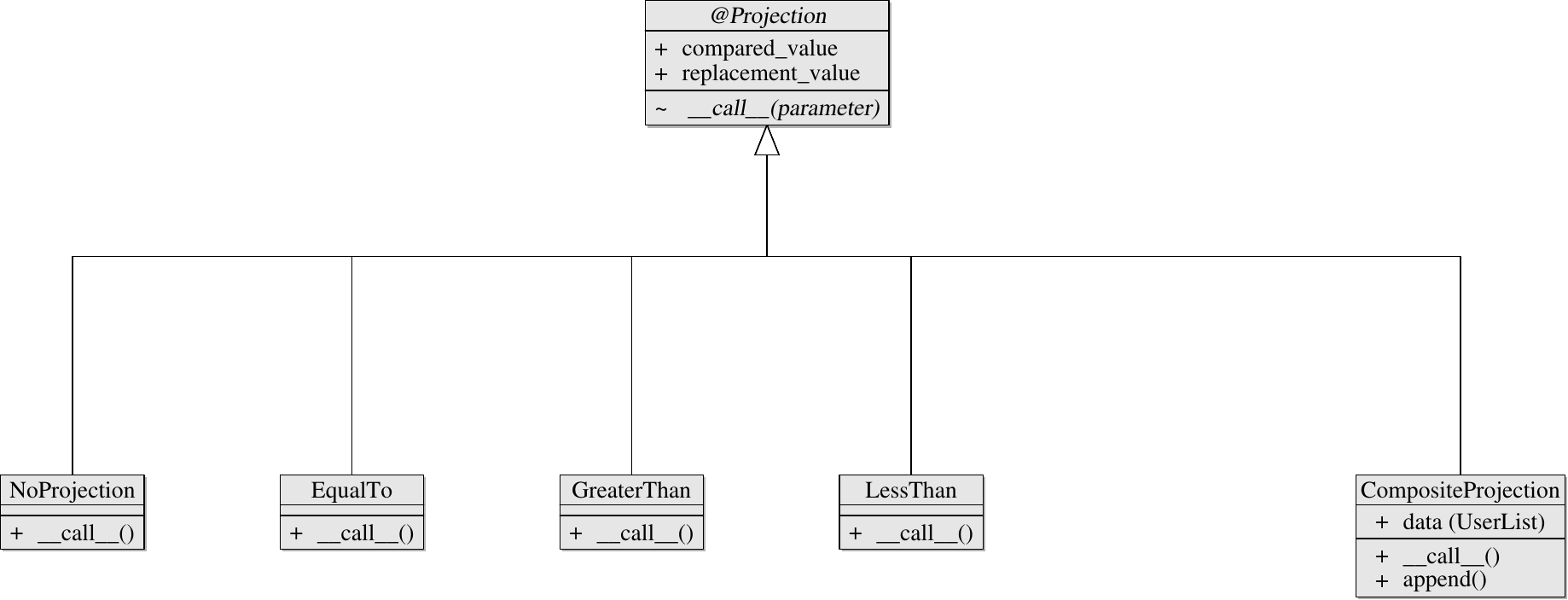
Projection family (Projection and concrete projections, including CompositeProjection).#
Creating Parameters#
Initialize parameters with various data types:
from pyralysis.reconstruction import Parameter
import numpy as np
import astropy.units as u

# From numpy array
numpy_data = np.random.random((100, 100))
param = Parameter(
    data=numpy_data,
    cellsize=0.1*u.arcsec,
    chunks=(256, 256)
)

# From dask array
import dask.array as da
dask_data = da.from_array(numpy_data, chunks=(256, 256))
param = Parameter(
    data=dask_data,
    cellsize=0.1*u.arcsec
)
Array Backend Support#
Pyralysis automatically handles different array types:
# Access underlying array
numpy_version = param.numpy_array      # Materialized host NumPy array
host_copy = param.to_host()            # Same parameter class, NumPy-backed data
dask_version = param.values            # Returns dask if that's the backend
xarray_version = param.data            # Returns xarray DataArray

# Check backend type
if param.is_dask():
    print("Parameter uses dask backend")
else:
    print("Parameter uses numpy backend")
Chunking Configuration#
Configure Dask chunking for optimal performance:
# Set chunking during creation
param = Parameter(
    data=data,
    chunks=(256, 256)  # Manual chunking
)

# Update chunking
param.chunks = (512, 512)

# Use automatic chunking
param.chunks = "auto"

# Rechunk existing parameter
param.rechunk(chunks=(128, 128))

# Check current chunks
print(f"Current chunks: {param.current_chunks}")
Mathematical Operations#
Full operator overloading for mathematical operations:
# Arithmetic operations
result = param * 2.0 + 5.0
result = param1 + param2  # Element-wise addition
result = param1 * param2  # Element-wise multiplication

# Comparison operations
result = param > 0.5
result = param1 <= param2

# Unary operations
result = abs(param)
result = -param

# Power operations
result = param ** 2
Memory Management#
Efficient memory handling for large datasets:
# Persist dask computations in memory
param.persist()

# Materialize a safe host snapshot for I/O or plotting without mutating param
host_param = param.to_host()

# Check memory usage
print(f"Memory usage: {param.memory_usage()}")

# Create copies
param_copy = param.copy(deep=True)    # Deep copy
param_shallow = param.copy(deep=False) # Shallow copy
Spatial Properties#
Manage spatial sampling and coordinate information:
# Set cellsize (physical size of each data element)
param.cellsize = [0.1, 0.1] * u.arcsec  # [x_size, y_size]

# Access spatial properties
print(f"Shape: {param.shape}")
print(f"Dimensions: {param.ndim}")
print(f"Size: {param.size}")
print(f"Pixel area: {param.pixel_area}")

# Validate cellsize
if param.cellsize is not None:
    print(f"Cellsize: {param.cellsize}")
Data Access Properties#
Comprehensive data access methods:
# Basic properties
print(f"Shape: {param.shape}")
print(f"Number of dimensions: {param.ndim}")
print(f"Total elements: {param.size}")

# Data access
numpy_data = param.numpy_array  # Materialized host NumPy array
host_param = param.to_host()    # Same-class host snapshot
dask_data = param.values        # Returns underlying array
xarray_data = param.data        # Returns xarray DataArray

# Attributes
attrs = param.attrs             # Dictionary of attributes
param.attrs = {"unit": "Jy/beam", "description": "Test image"}
Utility Methods#
Helper methods for parameter management:
# Check parameter state
if param.is_empty():
    print("Parameter contains no data")

if param.is_dask():
    print("Parameter uses dask backend")

# Memory information
memory_info = param.memory_usage()
print(f"Memory usage: {memory_info}")
Advanced Features#
Multi-dimensional Support: Handle images with arbitrary dimensions
Attribute Management: Store and retrieve metadata
Type Safety: Automatic type conversion and validation
Performance Monitoring: Track memory usage and computation time
Multi-dimensional Support#
Handle images with spectral and polarization dimensions:
# 3D image (spectral)
spectral_image = Parameter(
    data=np.random.random((100, 100, 50)),  # (height, width, channels)
    cellsize=0.1*u.arcsec
)

# 4D image (spectral + polarization)
pol_image = Parameter(
    data=np.random.random((100, 100, 50, 4)),  # (height, width, channels, stokes)
    cellsize=0.1*u.arcsec
)
Attribute Management#
Store and retrieve metadata:
# Set attributes
param.attrs = {
    "unit": "Jy/beam",
    "description": "Simulated image",
    "author": "User",
    "date": "2024-01-01"
}

# Access attributes
unit = param.attrs.get("unit", "unknown")
description = param.attrs.get("description", "No description")
Performance Optimization#
Best practices for optimal performance:
# Use appropriate chunking
param.chunks = (256, 256)  # Good for most use cases

# Enable persistence for repeated access
param.persist()

# Use in-place operations when possible
param *= 2.0  # In-place multiplication

# Monitor memory usage
print(f"Memory: {param.memory_usage()}")
Best Practices#
Choose Appropriate Chunking: Balance memory usage and computation efficiency
Use Persistence: Enable persistence for datasets accessed multiple times
Monitor Memory: Track memory usage for large datasets
Validate Data: Always check parameter properties after creation
Use Type-Safe Operations: Leverage operator overloading for clean code
Example: Complete Workflow
# Create parameter
param = Parameter(
    data=np.random.random((512, 512)),
    cellsize=0.1*u.arcsec,
    chunks=(256, 256)
)

# Set attributes
param.attrs = {"unit": "Jy/beam", "description": "Test image"}

# Perform operations
result = param * 2.0 + 1.0
result = abs(result)

# Optimize performance
result.persist()

# Save or use in optimization
print(f"Final shape: {result.shape}")
print(f"Memory usage: {result.memory_usage()}")